Motion de Censure

Game rules

Everything you need to know before entering the chamber.

Your first game in 60 seconds
FieldMediaInstitution
Objective

Secure the majority

Build more influence than the opposing candidate and win two rounds before they do.

Your first game in 60 seconds

To get started, remember these six steps.

  1. Choose a difficulty and an available party.

  2. During the mulligan, replace up to three cards if needed.

  3. Play one card on any row it allows.

  4. Complete every target and choice required by the card.

  5. Pass when you want to preserve the rest of your hand.

  6. Finish with the higher total influence and win two rounds.

A medal appears after every round won. Two medals win the debate.

  • A match lasts up to three rounds. The first candidate to win two rounds wins the debate.
  • Candidates take turns until both have passed. Once a candidate passes, they cannot return during that round.
  • At the end of a round, the Field, Media and Institution scores are added together to determine total influence.
  • Once both candidates have passed, end-of-round effects resolve, the winner is determined and every card on the board enters its discard pile.
  • If a round is tied, both candidates win it: a tie can therefore decide the entire match.
Before the debate

Prepare your campaign

Your progression determines which parties and cards are available, then the game automatically builds your deck.

  • Choose an unlocked party. In solo play, also choose the opposing candidate's difficulty.
  • A party starts with 20 base cards. Its Investiture gradually adds 4 advanced cards and then a signature card, bringing the deck to 25 cards.
  • You begin with 10 cards in hand and draw only 2 between rounds: your hand is never fully replenished.
  • During the mulligan, you may keep your hand or replace up to 3 cards before the debate begins.
  • Replaced cards are placed at the bottom of the deck after their replacements are drawn. They are not discarded.
  • Look for a hand that can build influence quickly while keeping flexible or complementary cards for later rounds.
3

European Green Deal

Climate · EuropeanInstitutional

This card gains +2 if the Institution row is your strongest.

A regulation becomes leverage when it is upheld, translated, and defended to its final recital.
Taking the floor

Play your turn

On your turn, play a card and resolve its choices, or pass to preserve your resources.

Play

Choose a card from your hand, then place it on one of its permitted rows.

Resolve

Select every target, option or row required by the card text.

Pass

You cannot play again during this round. The other candidate may continue until they also pass.

Passing at the right time is essential: cards you keep remain available for the following rounds.

  • A permanent card adds its influence to the chosen row, then resolves its effects. An Event resolves before entering the discard pile.
  • Every choice opened by a card must be completed before the turn changes. Only genuinely valid targets can be selected.
  • If the other candidate has already passed, you keep the floor after each card. You may catch up, but every action spends a resource needed later.
The chamber

Three influence rows

Every card shows the row or rows on which it may be played.

Field

Mobilization, activists, local representatives and direct contact with voters.

Often suited to mobilization engines and boosts shared between cards.

Media

Debates, interviews, communication, polling and public exposure.

A natural home for tempo plays, targeted boosts and sudden reversals.

Institution

Parliament, government, legislation, alliances and control of political machinery.

Often hosts control, protection and conditional effects.

Rows are not won separately: only the combined influence of all three decides the round. Playing into a weaker row may still be correct when a card's effect is more useful there.

The debate live

Read the board

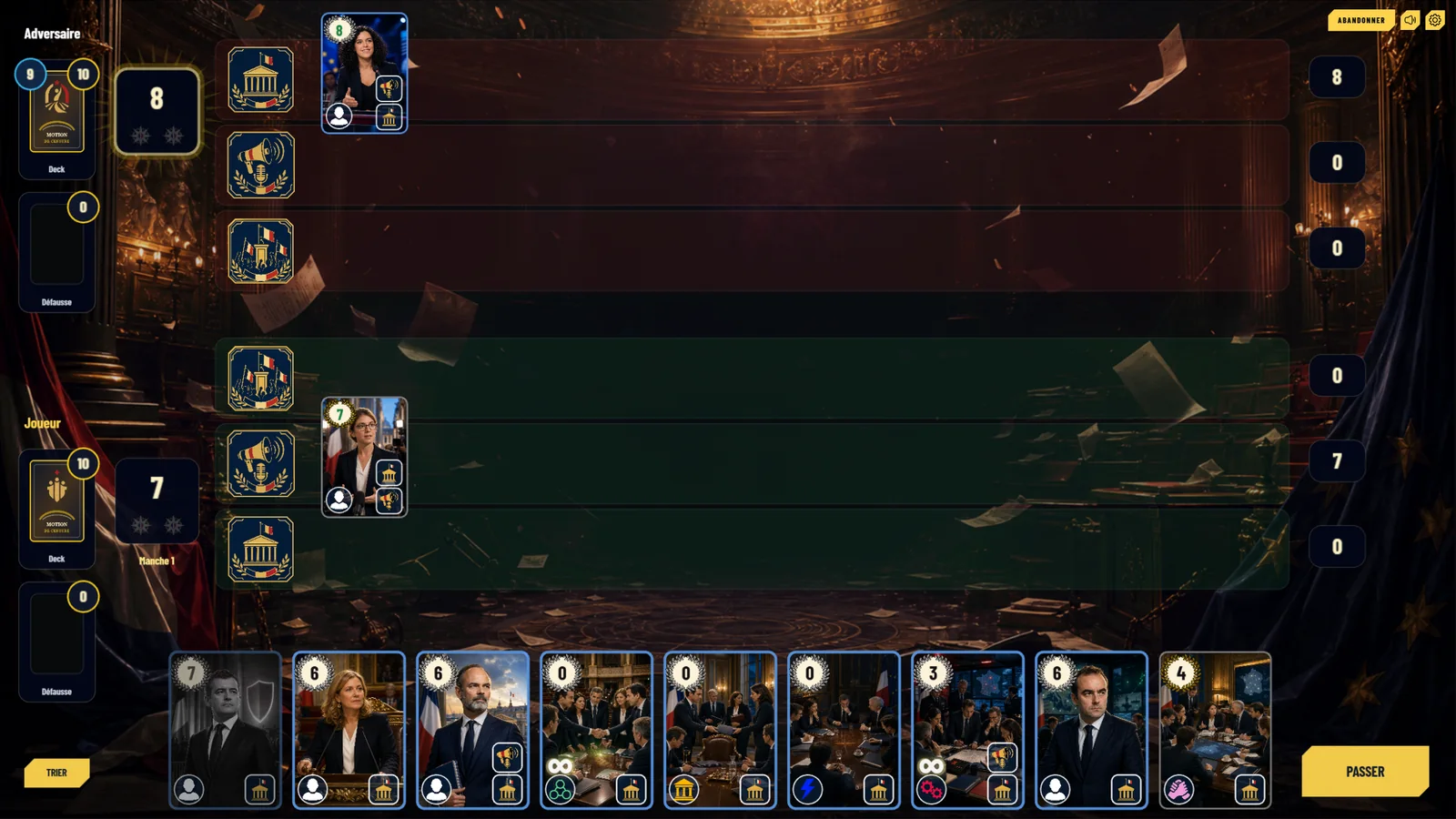
The board brings together both candidates, all six influence rows, every score and the controls needed to play.
Read the board
  1. Opposing candidate: identity, total influence, rounds and piles
  2. The opponent's three rows
  3. Your three rows
  4. Individual row scores
  5. Your candidate: identity, total influence, rounds and piles
  6. Your hand
  7. Messages, choices and targets
  8. Sort your hand
  9. Clock, Pass and Next round
  10. Forfeit, sound and Settings
  • Each candidate's total influence and round medals appear on the left. The six numbers on the right show the influence on each individual row.
  • Hollow shield: red means a candidate's upcoming boost may be cancelled; blue means protection from an upcoming penalty. Solid shield: blue means an Event cancellation is in reserve; red means a candidate's upcoming Event targeting the relevant row may be cancelled. Each indicator disappears when its corresponding preventions are used or expire.
  • The candidate who must act is highlighted in yellow. When it is not your turn, your cards are dimmed and cannot be played.
  • Hover over a card in your hand to enlarge it, then drag it to a permitted row. To reorder your hand, first pull a card slightly below the others, then move it to the position shown by the marker. Valid rows and targets are highlighted whenever a choice is required.
  • Deck and discard counters remain visible. The opposing candidate also has a counter showing how many hidden cards remain in their hand.
  • Central messages announce plays, passes, choices and results. The bottom-right button changes to “Next round” once the round is over.

A pale-blue flashing halo around the score signals an effect that will trigger at the end of a turn. A red halo signals an end-of-round effect and takes priority when both timings are present. Online, the clock appears above the Pass button during the final 30 seconds.

Your arsenal

Read and use a card

The detailed card view brings together all the information needed to choose your action.

0

Budget Amendment

Social · BudgetEvent

Give +2 to two allied cards, then play a Support from your hand.

The budget is the concrete language of compromise, with commas more expensive than expected.
  1. Influence0
  2. PartySocial-démocratie
  3. TypeEvent
  4. Playable rowsInstitution
  5. RarityCommon
  6. ProfilesSocial · Budget
  7. EffectGive +2 to two allied cards, then play a Support from your hand.

Profiles

Profiles describe the card's theme and identity. They are cosmetic: no effect, targeting rule or influence calculation depends on them.

Rarity

The color of the laurel wreath indicates the card's rarity. By itself, rarity guarantees neither more influence nor a stronger effect: always read the card text.

Not special

Figure

A political figure who provides influence and may have an immediate, conditional or delayed effect.

Remains on its row until the end of the round unless an effect says otherwise.

Not special

Support

A team, organization or political network that strengthens your presence on one or more rows.

Remains on its row until the end of the round unless an effect says otherwise.
Special card

Tactic

A tactical maneuver or setup whose effect may act immediately or later in the round.

Remains on its row until the end of the round unless an effect says otherwise.
Special card

Institutional

An institutional lever that can provide influence or establish a lasting effect.

Remains on its row until the end of the round unless an effect says otherwise.

Special card

Alliance

A political agreement that often benefits cards played after it or a specific family of cards.

Remains on its row until the end of the round unless an effect says otherwise.
Special card

Event

A one-off action or situation that does not permanently occupy a row on the board.

Resolves its effect, then immediately enters the discard pile.

Special card

Political Climate

A political context whose effect may be ongoing, conditional or triggered at a specific time.

Remains on its row until the end of the round unless an effect says otherwise.

Special card

Party Special

Your party's unique signature card, with an effect emblematic of its strategy.

Remains on its row until the end of the round unless an effect says otherwise.
What is a special-category card?

“Special category” is a mechanical category unrelated to rarity or power. It includes the Tactic, Institutional, Alliance, Event, Political Climate and Party Special types.

Figures and Supports are not special-category cards. When an effect mentions a special-category card, only the six types above qualify.

A Party Special belongs to this category, but is also the unique signature card of each party.

When does an effect trigger?

The card text states when its effect resolves:

  • When played: the effect resolves as the card is played.
  • After a card is played: the effect waits for a card matching its condition.
  • At the end of a turn: the effect triggers after the relevant candidate's action.
  • At the end of the round: the effect resolves before the final result is calculated.
  • Ongoing or conditional: the effect remains active while the card is present and not blocked.
Why can a card be dimmed?

A greyed-out card cannot be played right now. This can happen if:

  • it is not your turn;
  • you have already passed for the round;
  • none of its permitted rows can be selected;
  • its effect requires a valid target that does not exist;
  • its effect requires a compatible card in your hand and you do not have one;
  • a mandatory choice cannot be resolved.

A card that provides influence or prepares a delayed effect may remain playable without an immediate target, provided no other mandatory choice is missing.

  • Printed influence is the card's base value. Boosts, penalties and row modifiers can change the amount actually counted.
  • The effect text states its conditions, valid targets and timing: when played, during the round or just before the result.
  • An Event resolves and then enters the discard pile. Permanent cards remain on their row until an effect moves or destroys them.
  • Effects may boost, weaken, move, draw, protect, block or modify an entire row's score. Always read the condition before committing the card.
  • A blocked card is worth 0 and its ongoing effects are disabled. A pale-blue flashing halo around the score signals an end-of-turn effect; a red halo signals an end-of-round effect.

Boost

The card's current influence has increased.

Penalty

Current influence has fallen without changing the printed value.

Blocked

The card is worth 0 and no longer triggers active effects.

Delayed effect

The score may still change when the round is closed.

Gain the advantage

Manage the debate, not just the score

Influence wins a round, but card economy often wins the match.

Card economy

A victory secured with one card in hand is often worth more than a huge margin. Every card saved gives you more options later.

Tempo

Building influence quickly forces the other candidate to respond. A modest card with the right effect can create more pressure than an isolated high value.

Sacrifice a round

When catching up would cost too many cards, passing can be the best decision. Accepting one lost round prepares you for the decisive confrontation.

Keep the last word

Having more cards lets you play after the opponent passes and reveal your answers later. This advantage becomes crucial in the final round.

Before each play, ask two questions: how many cards must the opponent invest to answer, and how many will you have left after this round?

Progression

Develop your parties

Every completed debate advances your campaign, even after a defeat.

National progression

Mandate

Mandate tokens gradually unlock new parties and additional difficulty levels.

Party progression

Investiture

Investiture earned with your current party unlocks its advanced and signature cards.

  • Mandate tokens are cumulative and are never spent. Reaching a milestone automatically applies its unlock.
  • Every party has its own Investiture. Cards unlock at 60, 130, 180, 230 and 300 points, then join that party's deck automatically.
  • Higher difficulties award more progression. Once a track is complete, matches continue but that local progression track no longer earns points.
  • The first concession keeps the defeat rewards. From the second consecutive concession onward, no points are awarded until a match is completed.
  • Once Normal is available, Easy awards 60%. Once Hard is available, Easy awards 35% and Normal 70%. The highest available difficulty always keeps 100% of its rewards.

New cards are automatically added to the relevant party's deck. Victories accelerate progression, but finishing a match, even in defeat, also earns points.

Head-to-head

Face another candidate

Online play becomes available once you have unlocked at least two playable parties.

  • Matchmaking pairs you with a randomly selected available candidate. If nobody is found within 60 seconds, you can try again later.
  • The candidate with the lower progression chooses their party first. The second candidate then selects a different party from those they have unlocked.
  • Both candidates play with the same number of cards: the smaller deck size available to the two parties is used.
  • Party selection and the mulligan follow the same principles as solo play. Both candidates cannot represent the same party.
  • Every board turn lasts 60 seconds and includes all choices opened by the played card. The clock appears only during the final 30 seconds.
  • Online debates advance your campaign just like solo matches. After the match, you can request a rematch if your opponent is still available.
  1. 60 seconds to play
  2. 1st timeout: discard one card, then 10 seconds
  3. 2nd consecutive timeout: forced pass

The clock only applies on the board. It pauses during blocking animations and network interruptions; a valid action during the shortened turn restores the full 60 seconds.

In the chamber, the best card is often the one you knew when to keep.
In your hands

Navigate and decide

Every main action can be performed with either the mouse or the keyboard.

Navigate

Use the arrow keys or click the visible cards, chapters and options.

Confirm

Press Enter or click the active choice to confirm it.

Go back

Escape closes the open window or returns to the previous screen. Fullscreen can only be changed in Options.

  • Hover over a card to open its detailed view and read its influence, rows, profiles and complete effect.
  • A grayed-out card cannot currently be played: it may not be your turn, no row may be valid or a required condition may be missing.
  • The candidate whose turn it is appears in yellow on the board. Central messages and the journal confirm cards played, passes and resolved effects.
  • S: saves a screenshot to Pictures/Motion de Censure.
  • F: on the board, shows or hides the frames-per-second (FPS) counter.
Online identity

Your player name

To play online, you must choose a Motion de Censure (MDC) name.

  • You can create it as soon as online play is unlocked, and no later than before your first online match. The profile icon on the home screen lets you change it whenever the server is available.
  • Against the AI, your Steam name is shown until you create an MDC name.
  • Every MDC name must be unique, regardless of capitalization. It appears in online matches and standings. If you change it, your past results will show the new name too.
  • Choose a respectful name. Abusive, hateful, discriminatory, threatening or sexually explicit names, names that impersonate someone else, and names intended to harass are prohibited.

If these rules are broken, Motion de Censure reserves the right to hide the name or permanently replace it with a neutral one in online matches and standings.